
Descripción
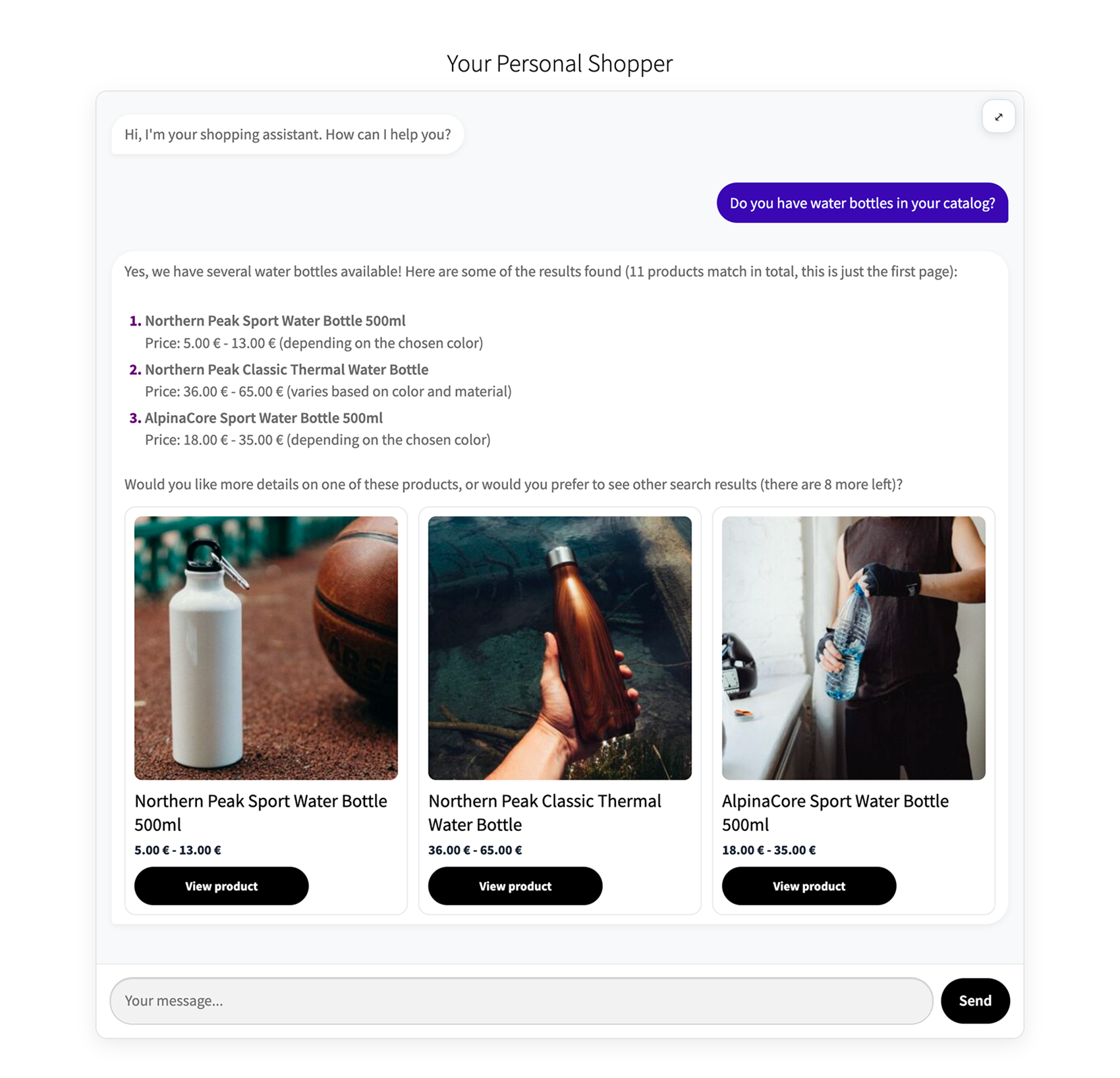
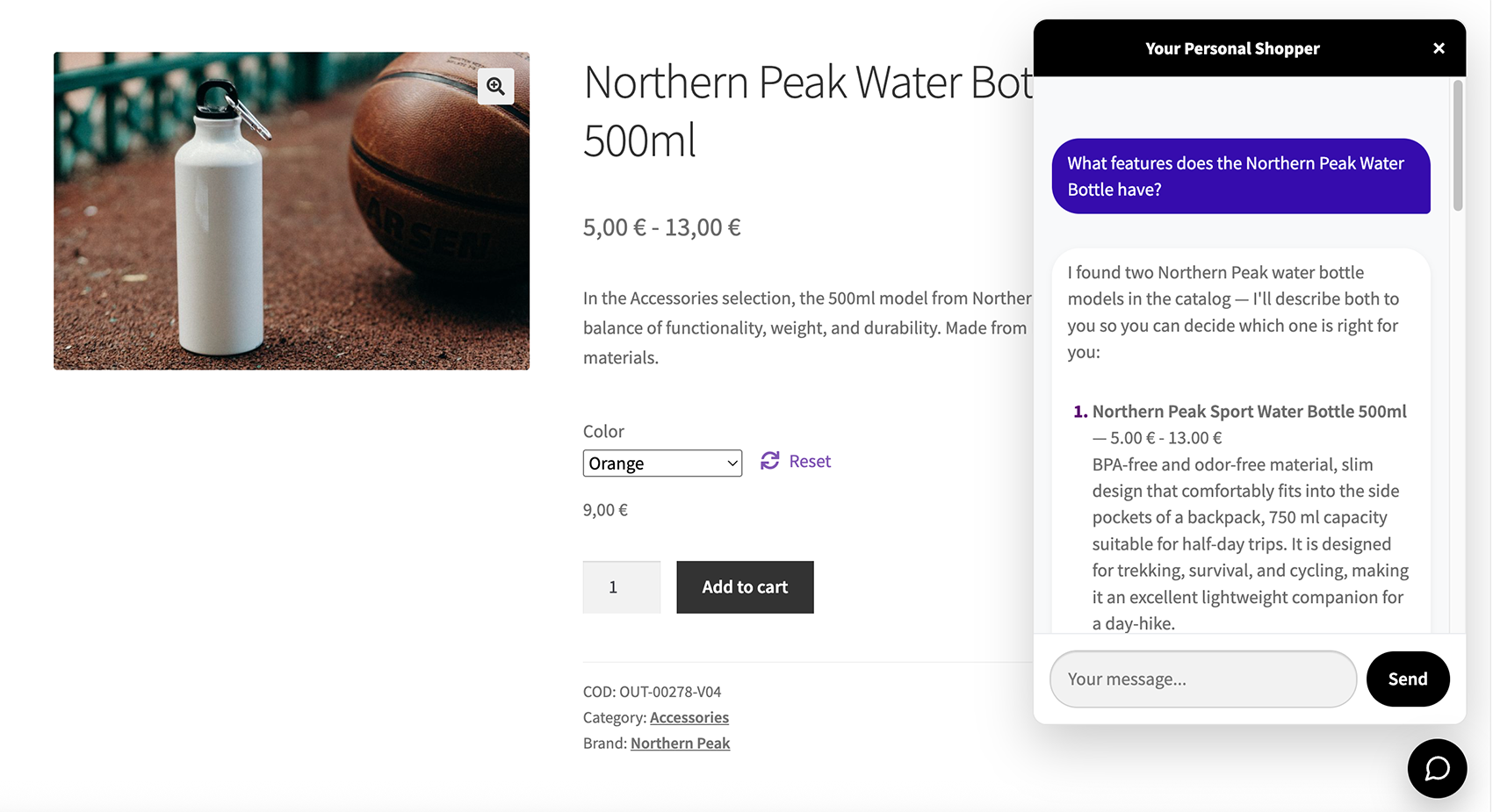
Kinedio Personal Shopper for WooCommerce adds a conversational shopping assistant to your storefront. Customers can ask questions in natural language to search your catalog, get product recommendations, view product details and add items to their cart, all from a single chat box.
The assistant is powered by Anthropic’s Claude models. When a customer sends a message, the plugin runs a server-side “agent loop”: the model decides which actions to take and your WordPress site executes them through a controlled set of tools (catalog search, product lookup, cart operations and so on). All cart and catalog operations run on your server under your control; the model only receives the data needed to answer the request.
Key features
- Conversational catalog search and product recommendations, including variable products (the assistant can resolve the right variation from the chosen attributes).
- View product details and product cards directly in the chat, with a turn progress indicator while the assistant works.
- Add to cart, change quantities and clear the cart from the conversation — unless catalog-only mode is enabled, which turns the store into a browse-only assistant with no cart operations.
- Catalog-only mode for stores that do not sell online: cart tools are disabled and the assistant guides shoppers to the product page instead.
- Works as a Gutenberg block (Kinedio Chat) or with the
[kinedio_chat]shortcode, with optional attributes to customize the title and texts (see the FAQ for the full list). - Optional floating chat widget with per-page visibility (everywhere, or include/exclude specific page IDs), device targeting, user-type targeting (guests, logged-in, admins) and an option to hide it on cart/checkout.
- Deferred loading for the floating widget: jQuery and the main chat script load only when the shopper opens the panel (skipped automatically when inline chat is on the same page).
- Optional support page links (Contact and FAQ): the assistant can direct shoppers to your existing WordPress pages for post-sale help or common questions, including in catalog-only mode.
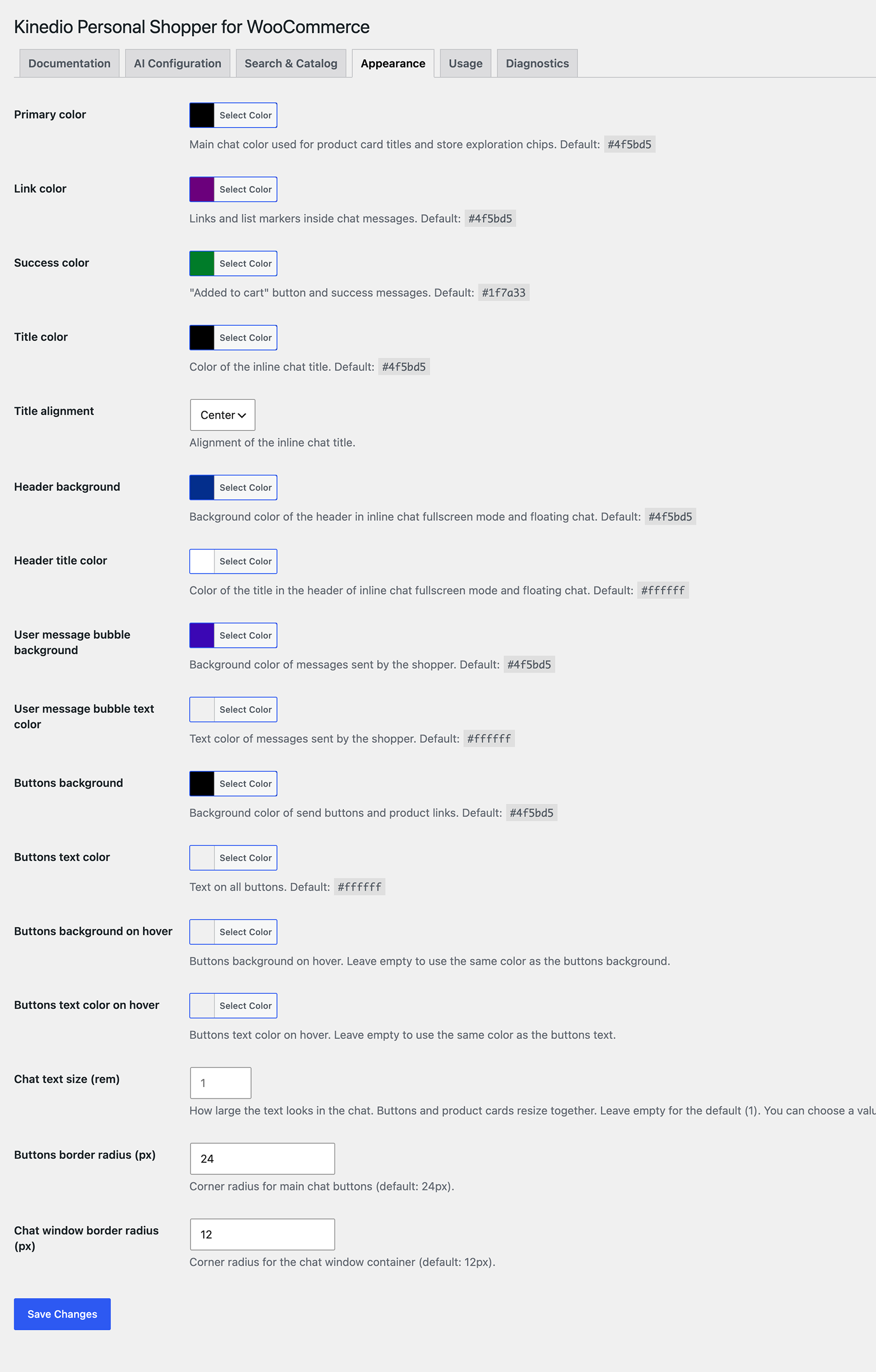
- Configurable chat text size (Appearance tab) for better readability on your storefront.
- Smarter catalog search: the assistant can try synonym and plural variants in a single search when an exact query returns no results.
- Built-in rate limiting (per logged-in user, or per IP for guests) to control usage and abuse.
- Admin controls for chat availability: manual pause, and automatic hide with an optional email alert when Anthropic returns a billing/credit error.
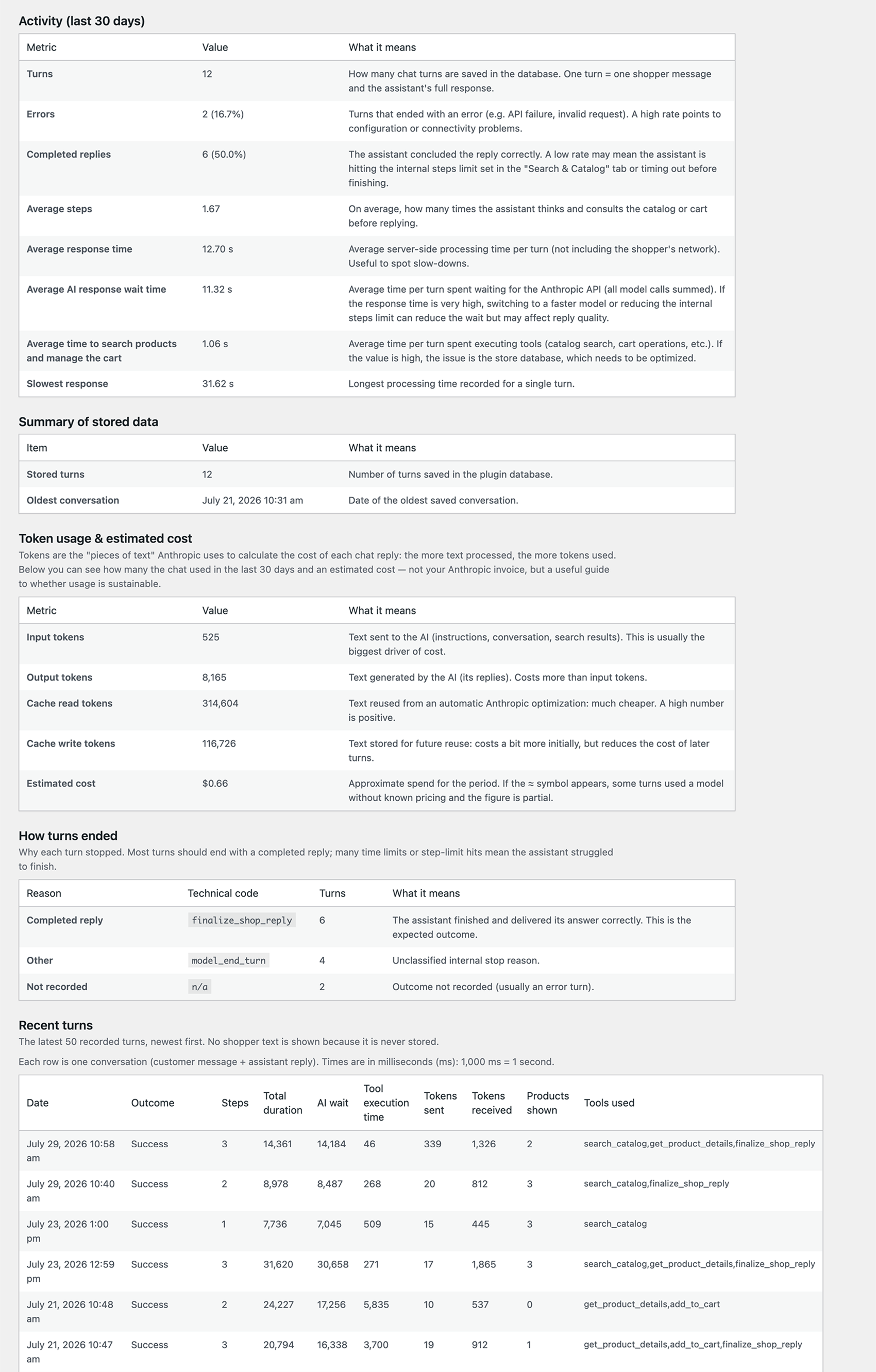
- Optional diagnostics: a dashboard of per-turn metrics (tokens, timings, outcomes, estimated cost) stored in a dedicated table.
- Multilingual ready: a
kinedio_i18n_providerfilter lets WPML/Polylang integrations supply translations. - WooCommerce HPOS (High-Performance Order Storage) compatible. The plugin uses the session cart only and does not read or write orders.
Important: this plugin requires an Anthropic API key, which you provide. Usage of the Anthropic API is billed by Anthropic according to their pricing. See the External services section below.
External services
This plugin connects to the Anthropic API (Claude) to generate the chat assistant’s replies. This is required for the plugin to function: without a valid Anthropic API key the chat will not respond.
What service is used
Anthropic Claude API — endpoint https://api.anthropic.com/v1/messages.
When data is sent
A request is sent to Anthropic each time a customer submits a message in the chat (and during the internal agent loop that follows, until the assistant produces its final reply).
What data is sent
* The customer’s chat message(s) and the ongoing conversation for the current session.
* Context needed to answer the request, which may include: product information from your catalog (names, descriptions, prices, attributes, taxonomy/term names) and the current contents of the visitor’s WooCommerce session cart.
* A system prompt and tool definitions generated by the plugin.
No WordPress user account credentials and no WooCommerce order data are sent. The Anthropic API key you enter is stored in your site’s database (encrypted with AES-256-GCM when the PHP OpenSSL extension is available, which is the case on virtually all hosts) and is sent only to Anthropic to authenticate the request.
Please make sure your store’s privacy policy informs visitors that chat messages are processed by Anthropic, and avoid entering personal or sensitive information into the chat.
Anthropic’s terms and policies:
* Terms of Service: https://www.anthropic.com/legal/consumer-terms
* Commercial Terms of Service: https://www.anthropic.com/legal/commercial-terms
* Privacy Policy: https://www.anthropic.com/legal/privacy
Credits
- Interface icons from Feather Icons (https://feathericons.com/), licensed under the MIT License.
Capturas
Bloques
Este plugin provee 1 bloque.
- Kinedio Chat AI shopping assistant: customers chat to search products, get recommendations and add items to the cart.
Instalación
- Make sure WooCommerce 8.2.0 or later is installed and active.
- Upload the plugin folder to
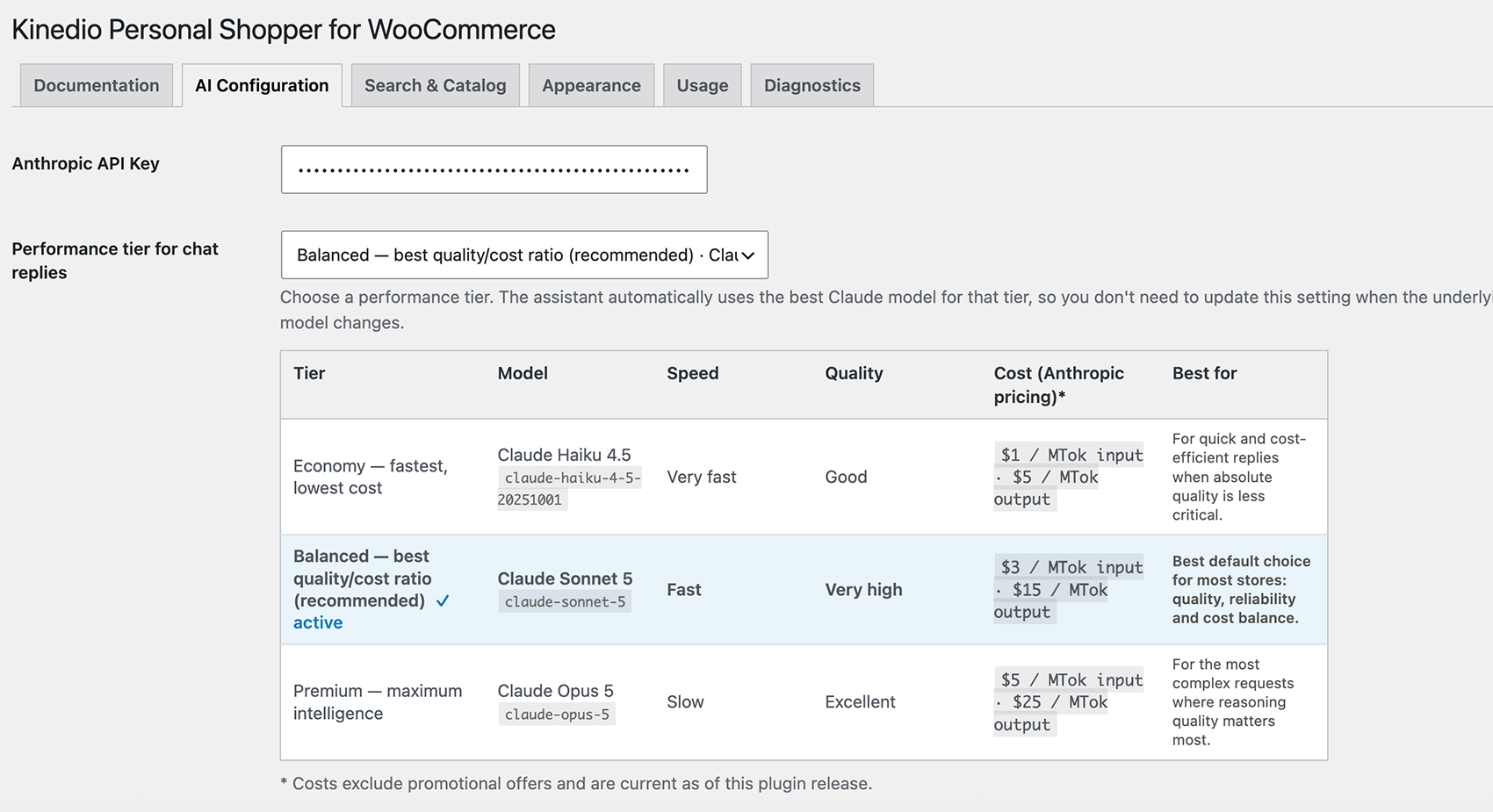
wp-content/plugins/, or install it from the Plugins screen, then activate Kinedio Personal Shopper for WooCommerce. - Open the settings from the top-level Kinedio Chat menu in the admin sidebar (also available under WooCommerce Kinedio Chat) and enter your Anthropic API key in the AI Configuration tab (where you can also choose a model). Settings are organised in tabs: Documentation, AI Configuration, Search & Catalog, Appearance, Usage and Diagnostics.
- Add the chat to a page using the Kinedio Chat block in the block editor, or the
[kinedio_chat]shortcode. Optionally enable the floating chat widget from the Usage tab.
Preguntas frecuentes
-
Do I need an account or API key?
-
Yes. You need an Anthropic API key, which you can create at https://console.anthropic.com/. Calls to the Anthropic API are billed by Anthropic according to their pricing.
-
Is WooCommerce required?
-
Yes. WooCommerce 8.2.0 or later must be installed and active. The plugin declares WooCommerce as a required plugin and will not run without it.
-
Which attributes does the [kinedio_chat] shortcode accept?
-
All attributes are optional:
title— heading shown above the chat (no heading is shown when empty).title_heading— heading level for the title, 1–6 (default 3).title_fullscreen— alternative title used in fullscreen mode (falls back totitle).welcome_message— first message shown by the assistant.placeholder— placeholder text of the message input field.button_text— label of the send button (default “Send”).
Example:
[kinedio_chat title="Ask our assistant" title_heading="2" welcome_message="Hi! How can I help you today?"] -
Is any data sent to a third party?
-
Yes. Chat messages and the catalog/cart context needed to answer them are sent to the Anthropic API. See the External services section for details on what is sent and when.
-
Where is my API key stored?
-
The key is stored in your site’s database with autoloading disabled. When the PHP OpenSSL extension is available (virtually all hosts) it is encrypted at rest with AES-256-GCM, using a key derived from your WordPress salts. Note that rotating those salts (e.g.
AUTH_KEY,SECURE_AUTH_KEYinwp-config.php) invalidates the encryption and you will need to re-enter the key. On the rare host without OpenSSL, the key is stored as sanitized plain text. -
What does the plugin log, and is any personal data stored?
-
The plugin has two independent, separately toggled features on the Diagnostics tab:
- Turn logging (
kinedio_turn_logging): writes operational entries to the WooCommerce logs (WooCommerce Status Logs) and, only ifWP_DEBUG_LOGis on, towp-content/debug.log. - Diagnostics (
kinedio_diagnostics_enabled): stores per-turn metrics in a dedicated database table for the in-admin dashboard.
In both cases the shopper’s chat message is never stored, free-text tool arguments/results are redacted (replaced by a length marker), and visitor IP addresses are not written to the logs. What is recorded is operational only: timings, token usage, iteration counts, tool names, outcome, product IDs (and, in turn logs, product titles/links of the cards shown and the WordPress
user_idfor logged-in users). To stop all logging, turn both toggles off. Note: the rate limiter uses the visitor’s IP in memory only (as a transient key for guests) to enforce request limits; it is never written to any log. - Turn logging (
-
Can I use it on a catalog-only store that does not sell online?
-
Yes. Enable catalog-only mode in the settings. The cart tools (add to cart, modify, clear, checkout prompts) are disabled, and the assistant guides shoppers to the product page or to contact the store instead of trying to sell online.
-
Does it support multilingual sites?
-
Yes. The plugin is translation ready and exposes a
kinedio_i18n_providerfilter so WPML/Polylang integrations can supply translated strings. -
What happens when I uninstall the plugin?
-
On uninstall, sensitive data is always removed: your Anthropic API key, rate-limit caches, taxonomy snapshot transients, and the diagnostics table.
Diagnostics settings (enable toggle, retention days, max rows, turn logging toggle) are also removed on uninstall to avoid stale diagnostic state after reinstall.
Your other settings (assistant voice, colors, floating widget options, etc.) are kept by default so you can reinstall without reconfiguring everything. To delete all plugin settings on uninstall, enable “Delete settings on uninstall” under Kinedio Chat AI Configuration before removing the plugin. -
Can developers customize the chat error message?
-
Yes. Developers can use the
kinedio_chat_user_error_messagefilter to customize the shopper-facing error text. The filter must return plain text only (no HTML). -
Is the plugin compatible with a strict Content Security Policy (CSP)?
-
Yes. The storefront chat does not rely on
unsafe-eval, inline event handlers (onclick, etc.), or browser calls to external APIs: JavaScript is loaded from your site via WordPress enqueue, chat requests go toadmin-ajax.phpon the same origin, and Anthropic is contacted server-side only. If you use a strict CSP site-wide, you typically only need to allow scripts and styles from your own domain (often with CSP nonces, as WordPress core and security plugins do). You do not need to addhttps://api.anthropic.comtoconnect-srcfor this plugin. Example baseline for pages with the chat:script-src 'self' 'nonce-…'; style-src 'self' 'nonce-…'; connect-src 'self'; object-src 'none'.
Reseñas
No hay reseñas para este plugin.
Colaboradores y desarrolladores
“Kinedio Personal Shopper for WooCommerce” es un software de código abierto. Las siguientes personas han colaborado con este plugin.
Colaboradores
Traduce “Kinedio Personal Shopper for WooCommerce” a tu idioma.
¿Interesado en el desarrollo?
Revisa el código , echa un vistazo al repositorio SVN , o suscríbete al log de desarrollo por RSS .
Registro de cambios
0.3.0
- Changed: floating widget deferred loading is always on (no admin toggle). jQuery and chat.js load when the shopper opens the panel; skipped when the inline shortcode or block is on the same page.
- New: optional Contact and FAQ page links (Search & Catalog tab). The assistant routes shoppers to your published WordPress pages for assistance or FAQs; catalog-only mode uses the contact link for purchase/checkout questions when configured.
- New: configurable chat text size in rem (Appearance tab); internal typography uses relative
emunits for consistent scaling. - Improved: catalog search tries synonym and plural variants (
search_term_groups) in one tool call when an exact query returns no results, reducing unnecessary AI retries. - Improved: “Add to cart” buttons on simple products appear on every results page, not only the first.
- Improved: variable-product cards stay visible during partial attribute selection; product links include partial attributes; attributes merge across messages.
- Improved: product-card action buttons share equal width and stack in a column.
- Improved: assistant prompt documents price sorting (
price_asc/price_desc). - Housekeeping: WordPress
Tested up toconfirmed at 7.0 (verified on 7.0.1);WC tested up toraised to 10.9.4.
0.2.2
- New: optional deferred loading for the floating chat widget (Usage tab). Defers jQuery and the main chat script until the shopper opens the panel; automatically disabled when the inline shortcode or block is on the same page.
- New: optional email alert (Usage tab) sent once when the chat is automatically hidden because Anthropic returned a billing or credit error. Configurable recipient with fallback to the site administrator email.
- Housekeeping: minimum WooCommerce version raised to 8.2.0 (tested);
WC tested up toremains 10.8.1. WordPressTested up toconfirmed at 7.0. Minimum PHP raised to 8.0 (code uses static closures, incompatible with PHP 7.4); tested on PHP 8.2.
0.2.1
- New: declared WooCommerce as a required plugin via the native
Requires Pluginsheader (WordPress 6.5+); the runtime activation/admin checks remain as a fallback. AddedWC requires at least/WC tested up toheaders. - Housekeeping: aligned the readme Stable tag with the plugin version, added the License URI and a documented External services section, and removed the placeholder Plugin URI from the header. Minimum WordPress version raised to 6.5.
0.1.9
- New: “Kinedio Chat” block (block editor) as an alternative to the shortcode — same inline renderer, no duplicated markup or styles.
- Anthropic API key (when stored encrypted): rotating the WordPress salts in
wp-config.php(e.g.AUTH_KEY,SECURE_AUTH_KEY) invalidates decryption — re-enter the key under WooCommerce Kinedio Chat.
0.1.0
- Initial scaffold release, reduced v1.