
Descripción
Want to replace the old ← Older posts | Newer posts → links with some page links?
This plugin provides the wp_pagenavi() template tag which generates fancy pagination links.
Usage
In your theme, you need to find calls to next_posts_link() and previous_posts_link() and replace them.
In the Twentyten theme, it looks like this:
<div class="nav-previous"><?php next_posts_link( __( '<span class="meta-nav">←</span> Older posts', 'twentyten' ) ); ?></div>
<div class="nav-next"><?php previous_posts_link( __( 'Newer posts <span class="meta-nav">→</span>', 'twentyten' ) ); ?></div>
You would replace those two lines with this:
<?php wp_pagenavi(); ?>
For multipart pages, you would look for code like this:
<?php wp_link_pages( ... ); ?>
and replace it with this:
<?php wp_pagenavi( array( 'type' => 'multipart' ) ); ?>
Go to WP-Admin -> Settings -> PageNavi for configuration.
Changing the CSS
If you need to configure the CSS style of WP-PageNavi, you can copy the pagenavi-css.css file from the plugin directory to your theme’s directory and make your modifications there. This way, you won’t lose your changes when you update the plugin.
Alternatively, you can uncheck the “Use pagenavi.css?” option from the settings page and add the styles to your theme’s style.css file directly.
Changing Class Names
There are filters that can be used to change the default class names that are assigned to page navigation elements.
Filters
wp_pagenavi_class_pageswp_pagenavi_class_firstwp_pagenavi_class_previouspostslinkwp_pagenavi_class_extendwp_pagenavi_class_smallerwp_pagenavi_class_pagewp_pagenavi_class_currentwp_pagenavi_class_largerwp_pagenavi_class_nextpostslinkwp_pagenavi_class_last
Filter Usage
// Simple Usage - 1 callback per filter
add_filter('wp_pagenavi_class_previouspostslink', 'theme_pagination_previouspostslink_class');
add_filter('wp_pagenavi_class_nextpostslink', 'theme_pagination_nextpostslink_class');
add_filter('wp_pagenavi_class_page', 'theme_pagination_page_class');

function theme_pagination_previouspostslink_class($class_name) {
  return 'pagination__control-link pagination__control-link--previous';
}

function theme_pagination_nextpostslink_class($class_name) {
  return 'pagination__control-link pagination__control-link--next';
}

function theme_pagination_page_class($class_name) {
  return 'pagination__current-page';
}


// More Concise Usage - 1 callback for all filters
add_filter('wp_pagenavi_class_previouspostslink', 'theme_pagination_class');
add_filter('wp_pagenavi_class_nextpostslink', 'theme_pagination_class');
add_filter('wp_pagenavi_class_page', 'theme_pagination_class');

function theme_pagination_class($class_name) {
  switch($class_name) {
    case 'previouspostslink':
      $class_name = 'pagination__control-link pagination__control-link--previous';
      break;
    case 'nextpostslink':
      $class_name = 'pagination__control-link pagination__control-link--next';
      break;
    case 'page':
      $class_name = 'pagination__current'
      break;
  }
  return $class_name;
}
Development
Créditos
- Plugin icon by SimpleIcon from Flaticon
Donations
I spent most of my free time creating, updating, maintaining and supporting these plugins, if you really love my plugins and could spare me a couple of bucks, I will really appreciate it. If not feel free to use it without any obligations.
Capturas

With Custom Styling 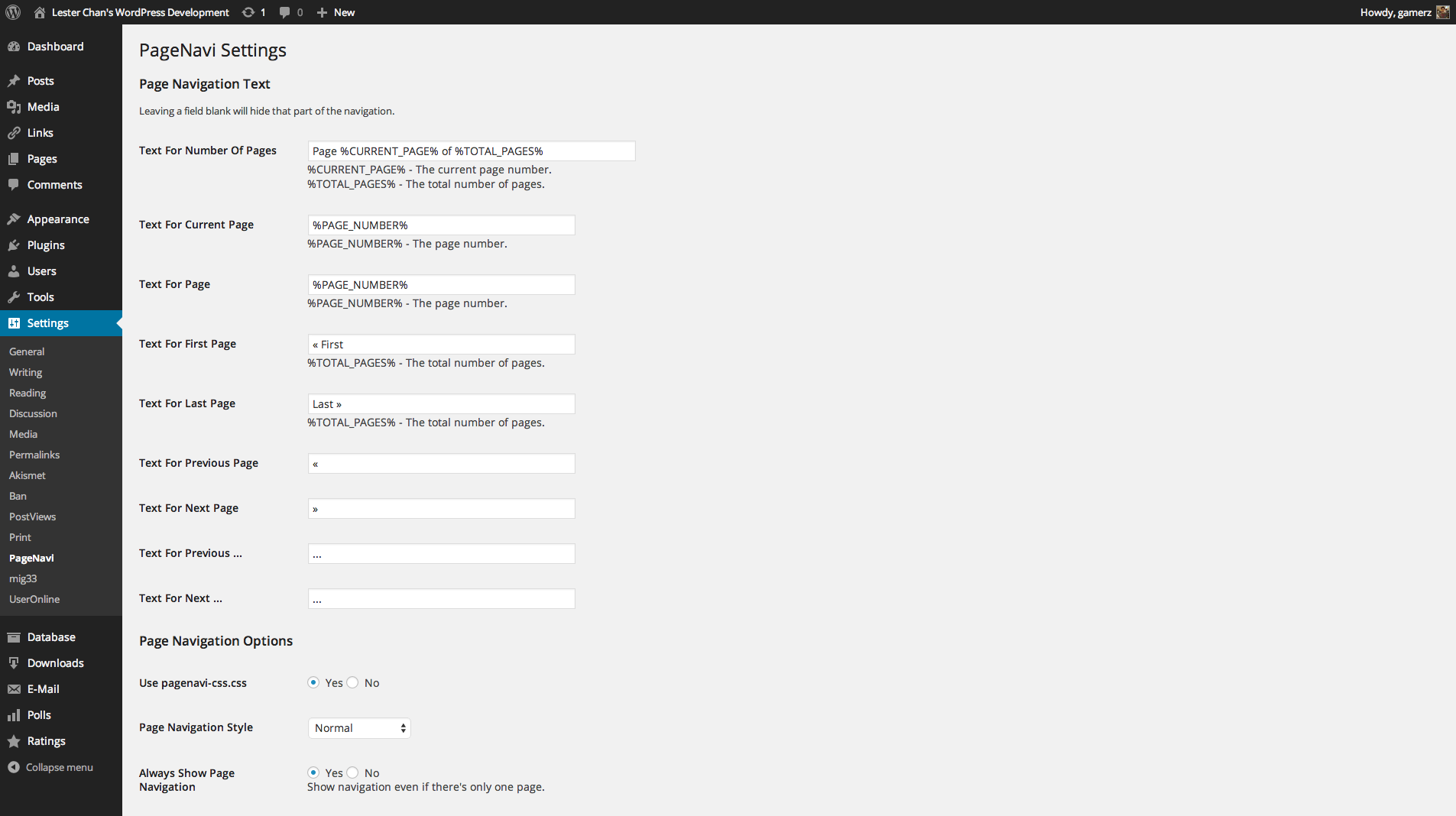
Admin - Options Page
Preguntas frecuentes
-
Error on activation: “Parse error: syntax error, unexpected…”
-
Make sure your host is running PHP 5. The only foolproof way to do this is to add this line to wp-config.php (after the opening
<?phptag):var_dump(PHP_VERSION); -
When I go to page 2, I see the same posts as on page 1!
-
You’re using
query_posts()wrong. See The Right Way To use query_posts() -
Yes; read this tutorial
-
How do I ignore the options page?
-
If you are running a multi-language plugin, you will probably want to ignore the strings in the options page.
You can do that like so:
<?php wp_pagenavi( array( 'options' => PageNavi_Core::$options->get_defaults() ) ); ?>
Reseñas


Colaboradores y desarrolladores
“WP-PageNavi” es un software de código abierto. Las siguientes personas han colaborado con este plugin.
Colaboradores

“WP-PageNavi” ha sido traducido a 53 idiomas. Gracias a los traductores por sus contribuciones.
Traduce “WP-PageNavi” a tu idioma.
¿Interesado en el desarrollo?
Revisa el código , echa un vistazo al repositorio SVN , o suscríbete al log de desarrollo por RSS .
Registro de cambios
2.94.1
- FIXED: PHP 8.2 warnings
2.94.0
- NEW: Add args param on wp_pagenavi filter. Props @asadowski10
- NEW: Improve accessibility of nav links. Props @carlabobak
2.93.4
- FIXED: Update SCB Framework To Support PHP 8
2.93.3
- FIXED: Update SCB Framework To Remove contextual_help
2.93.2
- NEW: Bumped to WordPress 5.4
- FIXED: Ensure Action Links is always an array
2.93.1
- FIXED: Duplicated Settings Saved admin_notices
2.93
- Remove screen_icon from SCB.
2.92
- Add title attr to pages link. Props @Mahjouba91.
2.91
- Validate text option against kses
- Update SCB Framework
2.90
- Remove po/mo files from the plugin
- Use translate.wordpress.org to translate the plugin
2.89.1
- FIXED: before and after args
2.89
- NEW: wrapper_tag option to allow other HTML tag besides DIV and wrapper_class option to allow other class name besides wp-pagenavi. Props @Mahjouba91.
2.88
- NEW: Added filters for altering class names. Props @bookwyrm
2.87
- NEW: Uses WordPress native uninstall.php
2.86
- NEW: Bump to 4.0
- NEW: Added rel=next and rel=previous
2.85
- FIXED: “Use pagenavi-css.css” & “Always Show Page Navigation” in the options are not being saved
2.84
- FIXED: Updated scb framework to fix scbAdminPage incompatible error
2.83
- added ‘echo’ parameter
- added Estonian and Bengali translations
- updated scbFramework
2.82
- fixed prev/next links not appearing in some conditions
- added Hebrew, Georgian and Azerbaijani translations
- updated scbFramework
2.81
- require an explicit type; fixes bugs with multipart pages
2.80
- support for multi-part pages and user queries
- moved prev/next links before/after first/last links
- more info
2.74 (2011-02-17)
- added ‘smaller’ and ‘larger’ classes
- added $query arg to wp_pagenavi()
- updated translations
- more info