WordPress.org

Español (Argentina)

  • Temas
  • Plugins
  • Noticias
    • Documentación
    • Foros
  • Acerca de
  • Conseguí WordPress
Conseguí WordPress
WordPress.org

Plugin Directory

WP Edit Username

  • Enviá un plugin
  • Mis favoritos
  • Acceder
  • Enviá un plugin
  • Mis favoritos
  • Acceder

WP Edit Username

Por Sajjad Hossain Sagor
Descargar
Vista previa en vivo
  • Detalles
  • Valoraciones
  • Instalación
  • Desarrollo
Soporte

Descripción

This plugin adds feature to edit/change user username.

Features:

  • Edit Username: Allows editing of usernames.
  • Only users with the edit_other_users() capability can change usernames.
  • If the “Send Email” option is enabled, the user will receive a notification email when their username is changed.
  • You can customize the email subject and body text in the admin dashboard or via filter hooks.
  • Modify the email subject using the filter: wpeu_email_subject.
  • Modify the email headers using the filter: wpeu_email_headers.
  • Adjust the email body content using the filter wpeu_email_body. (Note: $new_username and $old_username are automatically prepended to the email content).

Hooks Usage:

<?php

add_filter( 'wp_username_changed_email_subject', 'change_email_subject' );

function change_email_subject( $subject )
{
    $subject = 'Your customized subject';

    return $subject;
}

add_filter( 'wp_username_changed_email_body', 'change_email_body' );

function change_email_body( $old_username, $new_username )
{
    $email_body = "Your custom email text body.";

    return $email_body;
}

?>

Capturas

  • Settings panel for WP Edit Username plugin.
  • Username Edit Button.
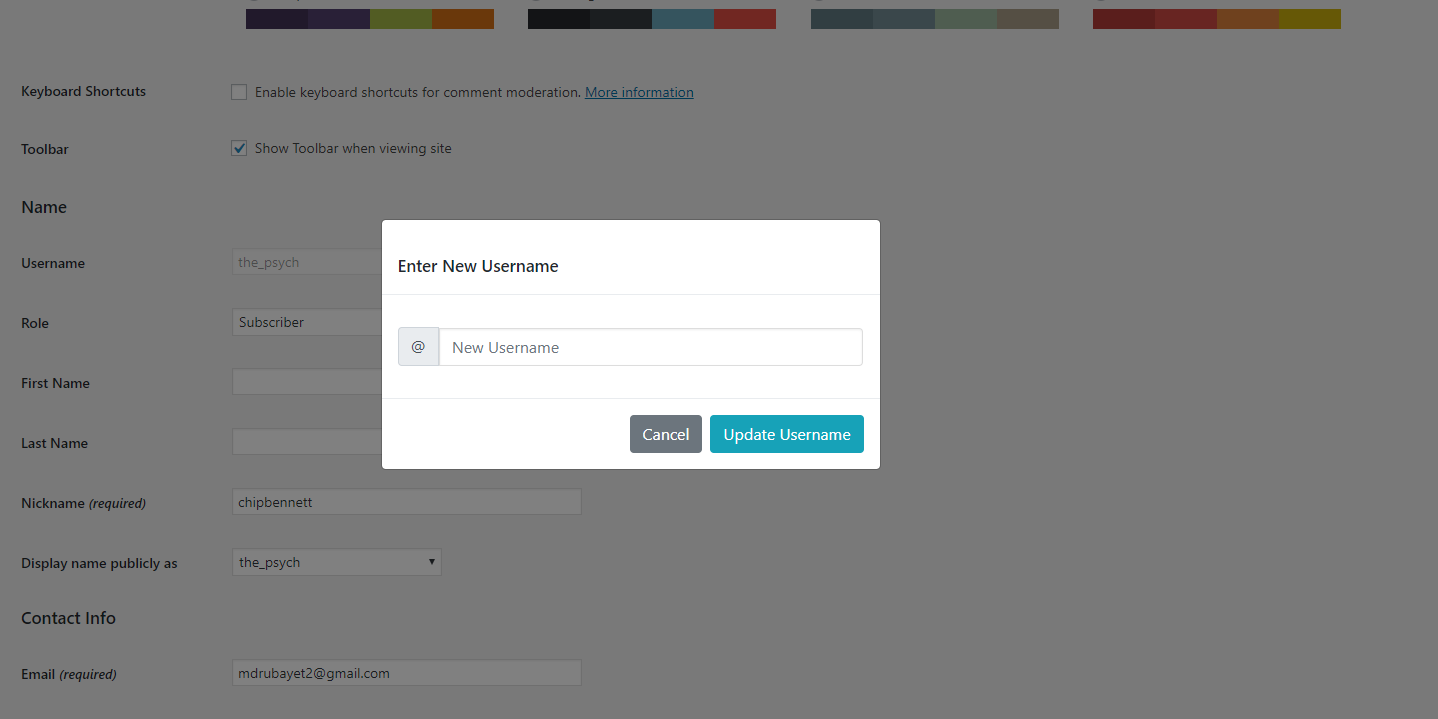
  • New Username Input Field.
  • After Username Changed Message.

Instalación

To add a WordPress Plugin using the built-in plugin installer:

Go to Plugins > Add New.

  1. Type in the name “WP Edit Username” in Search Plugins box
  2. Find the “WP Edit Username” Plugin to install.
  3. Click Install Now to begin the plugin installation.
  4. The resulting installation screen will list the installation as successful or note any problems during the install.
    If successful, click Activate Plugin to activate it, or Return to Plugin Installer for further actions.

To add a WordPress Plugin from GitHub repo / plugin zip file :
1. Go to WordPress plugin page
2. Click Add New & Upload Plugin
3. Drag / Click upload the plugin zip file
4. The resulting installation screen will list the installation as successful or note any problems during the install.
If successful, click Activate Plugin to activate it, or Return to Plugin Installer for further actions.

Preguntas frecuentes

How to use this plugin?

Just after installing WP Edit Username plugin, Go to user profile and edit user username by clicking Edit button.

Update inputs according to your requirement and you are good to go.

Reseñas

gets the job done

ahmedalaa01v 5 de septiembre de 2024
gets the job done

does its job 😉

default-design 29 de agosto de 2023
does its job 😉

Easy, quick! PLEASE UPDATE FOR CURRENT WP VERSION

gpworx 14 de diciembre de 2022
THANK YOU!!! Using this plugin with ProfileGrid and could not change user names — even from phpMyAdmin. This plugin does the job AND offers to send an email to the user and admin about the change. Awesome! Please update this plugin for security with the latest version of Wordpress. Thank you again!

Good

Tanjimul Islam 30 de abril de 2018
Nice effort…Well done! We want more.

nice WP Edit Username

parvezpreo 29 de abril de 2018
good working .. Awesome plugin. #LOVE it
Leer todas las 5 reseñas

Colaboradores y desarrolladores

“WP Edit Username” es un software de código abierto. Las siguientes personas han colaborado con este plugin.

Colaboradores
  • Sajjad Hossain Sagor

“WP Edit Username” ha sido traducido a 1 idioma. Gracias a los traductores por sus contribuciones.

Traduce “WP Edit Username” a tu idioma.

¿Interesado en el desarrollo?

Revisa el código , echa un vistazo al repositorio SVN , o suscríbete al log de desarrollo por RSS .

Registro de cambios

2.0.4

  • Fixed issue: typo giving fatal error

2.0.3

  • Applied security patch and added more html tags to the allowed html list

2.0.2

  • Checked for latest wp version 6.8

2.0.1

  • Minor changes in codebase only.

2.0.0

  • Major changes in codebase. Compatibility checkup for latest wp version 6.7, updated bootstrap to latest, removed unused css and added confirmation before submitting username change form.

1.0.8

  • Updated button type from default ‘submit’ to ‘button’

1.0.7

  • Checked for latest wp version 6.6

1.0.6

  • Fixed Plugin settings XSS vulnerability.

1.0.5

  • Added additional email sender : User Only. Added bunch of shortcodes to use in the subject and email body.

1.0.4

  • Checked for latest wp version 6.3

1.0.3

  • Checked for latest wp version & updated coding styles… major changes nothing

1.0.2

  • Checked for latest wp version & updated coding styles… major changes nothing

1.0.1

  • Checked for latest wp version & updated coding styles… major changes nothing

1.0.0

  • Initial release.

Meta

  • Versión 2.0.4
  • Última actualización hace 4 meses
  • Instalaciones activas 2.000+
  • Versión de WordPress 5.6 o superior
  • Testeado hasta 6.8.3
  • Versión de PHP 8.0 o superior
  • Idiomas

    Chinese (Taiwan) y English (US).

    Traducir a tu idioma

  • Etiquetas:
    ajaxChange Usernameprofile-edituser profileusername
  • Vista avanzada

Valoraciones

5 de 5 estrellas.
  • 5 valoraciones de 5 estrellas 5 estrellas 5
  • 0 valoraciones de 4 estrellas 4 estrellas 0
  • 0 valoraciones de 3 estrellas 3 estrellas 0
  • 0 valoraciones de 2 estrellas 2 estrellas 0
  • 0 valoraciones de 1 estrellas 1 estrella 0

Agregar mi reseña

Ver todas las reseñas

Colaboradores

  • Sajjad Hossain Sagor

Soporte

¿Tenés algo que decir? ¿Necesitás ayuda?

Ver el foro de asistencia

  • Acerca de
  • Noticias
  • Hosting
  • Privacidad
  • Escaparate
  • Temas
  • Plugins
  • Patrones
  • Aprender
  • Soporte
  • Desarrolladores
  • WordPress.tv ↗
  • Involucrate
  • Eventos
  • Donar ↗
  • Five for the Future
  • WordPress.com ↗
  • Matt ↗
  • bbPress ↗
  • BuddyPress ↗
WordPress.org
WordPress.org

Español (Argentina)

  • Visitá nuestra cuenta de X (anteriormente Twitter)
  • Visitá nuestra cuenta de Bluesky
  • Visitá nuestra cuenta de Mastodon
  • Visitá nuestra cuenta de Threads
  • Visitá nuestra página de Facebook
  • Visitá nuestra cuenta de Instagram
  • Visitá nuestra cuenta de LinkedIn
  • Visitá nuestra cuenta de TikTok
  • Visitá nuestro canal de YouTube
  • Visitá nuestra cuenta de Tumblr
El código es poesía.